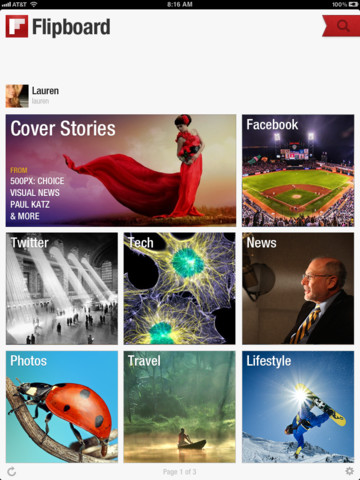
I am on an ongoing quest to make technology my friend and not my foe (see Techs and Balances). Lately, my favorite technology friend-maker is Flipboard.

I’m seriously late to the game on this one. Apple named it App of the Year….in 2010, and Time proclaimed it one of the Top 50 Innovations…once again, in 2010.
So I’m 2 years behind?! Whatever…in my everyday life, I couldn’t find one person I know who was already using Flipboard. So either we’re all collectively living in the dark or it’s just not mainstream, yet. Well, as I promised you, when I find something incredibly sensible and useful, I will share.
What is it?
It is a social media and news aggregator that puts all the stuff you already like to read and put it into a pretty format. In fact, that pretty format looks remarkably like a magazine complete with “flippable” pages. So you can basically be your own magazine editor, which always sounded like a pretty cool job to me.
How does it work?
You create a Flipboard account and sync it to social media (Facebook, Twitter, LinkedIn, etc) and then you add categories (News, Recipes, Lifestyle, etc). Flipboard puts it all together so that you can access all of this content in one graphically pleasing spot. Flipboard saves you from having to visit multiple sites and is ten times better than just using “bookmarks”or “favorites” on your web browser.
In the old days of “favorites” or “bookmarks” you had to do all the work by individually visiting the sites you liked. Now, Flipboard brings the content of your chosen sites and/or categories and brings it to you, in addition to providing you other content it thinks you may be interested in. I like things that do work for me.
Each category or source is displayed as a pretty little box on your Flipboard pages (so far you only get 2 pages). You can “flip” the pages like a real magazine, and you can even save an article to read later by using the ReadItLater option (more on this below).
Are there are other apps like this?
 RSS: “Really simple syndication” is a way to follow blogs or sites, similar to the bookmark concept, but it pulls the information together in a standard simple text format without all the pretty images and layouts. Most sites now have an icon called a “chicklet” that looks like this:
  . Clicking on this button will let you subscribe to get updates on when there is new content on that site. These subscribed updates are typically called feeds. To access your feeds, you’ll need an RSS aggregator or feed reader. Such as…
Google Reader: If you have a Google account, you can sign up for Google Reader which will aggregate your RSS Feeds based on when each is updated. Unlike Flipboard, it doesn’t add any other things for you to read and the layout is very basic.
 Zite: This app populates your Zite page with content it thinks you would like based on what you’ve already put into your Google Reader and what kind of Twitter feeds you subscribe to. If you don’t subscribe to these things, Zite will still let you setup an account, and you can manually choose which categories you want to follow.
Zite uses a special algorithm to figure out what content you’d like, and then delivers that to you, as well.
One advantage Zite has over Flipboard is that it puts the original article in its entirety in the app, while Flipboard often makes you read the rest of the article in a browser. The layout is prettier than Google Reader, but not as flashy as Flipboard.
 GoogleCurrents: this is Google Reader’s attempt to be more magazine-like. Like Flipboard, you can sync with social media, but it doesn’t really support Facebook choosing instead to try to focus on and push Google+.
There is also Pulse, which is similar to Flipboard. I haven’t downloaded this, so I can’t really opine on it, but it seems to be the 3rd most-liked news-aggregator based on my informal internet research.
What if I see something I want to read but I don’t have time to read it now?
Flipboard lets you opt to “Read it Later” using either Instapaper or Pocket (aka Read it Later).
Both of these are services that enable you to save web content in one area for you to read it later. Once saved, you can login to these services and read your saved material even without an internet connection. Both of these are great, not just for Flipboard, but for any web browsing.
Can I make SensibleSusan a Category in Flipboard?
Absolutely! In Flipboard, there’s a red ribbon in the upper right hand corner than lets you add sources. You can type “http://sensiblesusan.com/feed/” into the Search field and SensibleSusan.com should pop up. Click on my blog and it will come up in Flipboard. There will be a button on the upper left that says “Add”. Click this and you will have added SensibleSusan to your Flipboard.
In addition, if you want the RSS Feed to access through some other reader, just click on the RSS button on the sidebar to the right of this site.
What are the limitations?
Flipboard is only available on iPad, iPhone and Android as of now. It would be great it there was a desktop version, as well.
Bottom Line:
Google Reader is the easiest way to aggregate RSS feeds but it looks the least exciting since all feeds are converted to plain text.
Zite makes your life easier by bringing content to you and putting it into a newspaper-like format.
Flipboard also makes life easier by bringing content to you, but it incorporates social media, too and looks more like a magazine.
Personally, I like to use Flipboard to read mostly fun, image-driven content and Zite to read news. In other words, Flipboard is my magazine and Zite is my newspaper.
I have only presented a handful of the options out there. I’m curious to know what you’re using that you think is great – please share!
*Oh, and in case I didn’t make it clear enough above, please make sure to sign up for your SensibleSusan updates either through email or RSS (see the sidebar where you can put in your email address or click my chicklet).


 Susan Van Sciver